- Choosing a CMS in 2026 is about integration tolerance and scalability to adapt to growing business needs.
- AI, performance, and flexibility are essential to future-proof your CMS and streamline operations.
Choose the Right Content Management System
Published on: 27 February 2026
Last updated on: 15 June 2026

You’re staring at your CMS dashboard, wondering why it’s so hard to just get things done.
Content updates are slower than they should be, your team’s frustrated, and it feels like you’re always working around the system instead of with it.
Sound familiar?
This is a story I hear all the time from businesses trying to navigate the maze of content management options.
CMS choices in 2026 are no longer simple, and many businesses are stuck in a painful cycle of switching platforms, only to face the same problems again.
You’ve probably asked yourself: Why is this so difficult?
It’s because choosing the right CMS isn’t just about picking a tool, it’s a strategic decision.
And in 2026, that means understanding not just what your CMS can do today, but how it will adapt and scale with your needs tomorrow.
With digital transformation moving at lightning speed, your CMS is the engine that powers your content’s growth. But only if it’s the right fit.
So, what does it take to choose the right CMS this year?
Let’s break down the key factors you should focus on, so you don’t have to feel stuck anymore.
The CMS Landscape in 2026
Remember when choosing a CMS was all about checking off features?
In 2026, it’s less about what a CMS can do today and more about how well it integrates with your entire digital ecosystem.
The real question is: how well does your CMS work with everything else?
Take a moment and think: how many tools do you use that don’t talk to each other? Wasted time, frustrated teams.
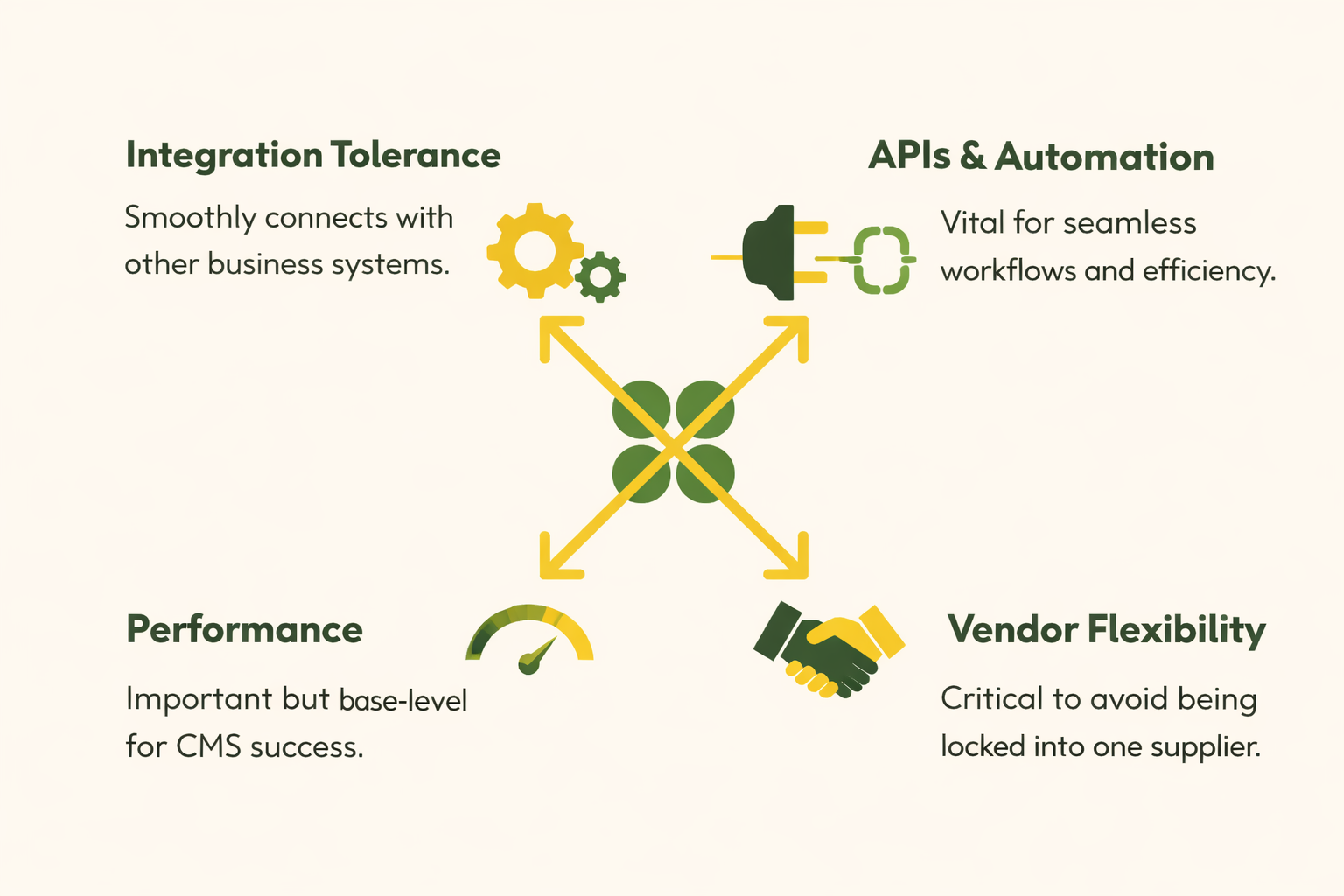
Integration Tolerance
In 2026, it’s all about integration tolerance and how seamlessly your CMS works with the other systems you rely on.
Here’s the breakdown:
- Monolithic CMS: Simple but struggles with modern integrations and scaling.
- Headless CMS: Flexible, but requires a lot of developer work to connect systems.
- Composable CMS: Most flexible but brings complexity and needs solid management.
Why does this matter?
A CMS with high integration tolerance reduces friction, lets you deploy faster, and connects smoothly with other tools.
For example, a CMS that syncs perfectly with your e-commerce platform and CRM lets you launch new products in minutes, without the headaches.
APIs & Automation
In 2026, AI and automation are no longer a bonus feature. They’re the foundation of a modern CMS.
If your CMS isn’t using AI to assist with content creation, translation, accessibility, and optimization, you're already behind the curve.
Just think about it, AI can streamline content workflows, improve efficiency, and help personalize user experiences all without additional manual input.
From AI-driven translations to automated content tagging, the technology is already here to take your content operations to the next level.
- AI-Assisted Editing: Imagine having AI suggest tone adjustments or flag inconsistencies as you write. No more back-and-forth edits.
- Automated Content Personalization: AI can tailor content to different audiences, learning from user behavior to create more relevant experiences.
- Content Optimization: With built-in AI, your CMS can automatically optimize your content for SEO, adjusting keywords and metadata based on real-time trends.
The best part?
AI’s role isn’t just in the background. It’s tightly integrated into the core functionality of modern CMS platforms, meaning it’s built to simplify and accelerate your content workflows.
But here's the catch, not all CMSs are created equal. As with any new technology, there's a risk of fragmentation.
External AI tools can create latency, add complexity, and lead to a data-handling nightmare.
That's why AI should be native within the CMS, ensuring governance, compliance, and data protection aren’t compromised.
Performance
In 2026, performance isn’t just about speed. It’s a critical SEO factor. Google’s Core Web Vitals, a set of metrics that measure user experience, are now directly tied to search rankings.
That means if your CMS isn’t optimized for performance, it’s hurting your site’s visibility and ultimately, your revenue.
A CMS that supports fast load times, CDN integration, and real-time caching isn’t just an asset; it’s a necessity. Performance directly affects everything from bounce rates to user retention, and it’s what will keep you ahead of competitors.
- Edge Deployment: Your CMS should support edge-first delivery, ensuring faster load times by bringing content closer to users.
- Cache Management: Instant cache purging and optimized media are non-negotiable for keeping your site responsive, especially for high-traffic sites.
- Multi-Region Performance: For global businesses, multi-region CMS deployment ensures content loads quickly no matter where your users are.
But here’s the kicker:
If your CMS doesn’t have built-in performance
optimization, like automated cache invalidation or image/video
compression, you’ll be left behind in a world where milliseconds matter.
Vendor Flexibility
In 2026, the last thing you want is to be locked into a single vendor that no longer meets your needs.
As CMS platforms evolve, flexibility is more important than ever. You need a CMS that adapts to your business goals, not one that forces you to adapt to its limitations.
- Vendor Lock-In Risks: Choosing a CMS that limits your ability to switch vendors or adapt to new technologies can lead to costly exits down the road. Flexibility should be built into your CMS platform, ensuring you can evolve with the industry without jumping through hoops.
- Open-Source vs. Proprietary: Open-source CMS platforms offer greater control and less vendor dependency, but come with maintenance overhead. On the other hand, proprietary platforms might reduce the burden of upkeep, but you may face higher costs and limitations on customization.
- API-First and Modular Systems: The rise of composable CMS means your system is modular and easily replaceable. You’re not stuck with a single vendor. This allows you to mix and match best-in-class solutions, ensuring you get exactly what you need without compromises.
The key takeaway?
In 2026, flexibility is non-negotiable. A CMS that locks you into one vendor could restrict your ability to innovate and grow in the fast-evolving digital landscape.
Security & Compliance
In 2026, security and compliance are no longer optional; they’re critical. With the rise of cyber threats, data breaches, and tightening regulations like GDPR, your CMS needs to ensure that content security is baked into its foundation, not an afterthought.
Data residency and compliance certifications are top priorities for businesses that operate globally. You need a CMS that offers granular security controls, like role-based access, data encryption, and audit trails to ensure you’re always in control of your content and data.
- Granular Permissions: Make sure your CMS supports fine-grained access controls, so only authorized users can manage sensitive content.
- ISO and SOC2 Compliance: Your CMS should have certifications like ISO 27001 and SOC2 to demonstrate that the platform adheres to industry-leading security standards. This is crucial if you're dealing with customer data or operating in regulated industries.
- AI Governance & Security: As AI becomes integrated into CMS platforms, it’s critical to have clear guidelines on how AI-driven features handle sensitive data. Ensure that AI plugins are secure and compliant with regional regulations, reducing the risk of unauthorized data sharing.
A CMS without robust security features is an open invitation for data breaches. Don’t compromise; ensure your CMS has the necessary protections in place to secure both content and customer data.
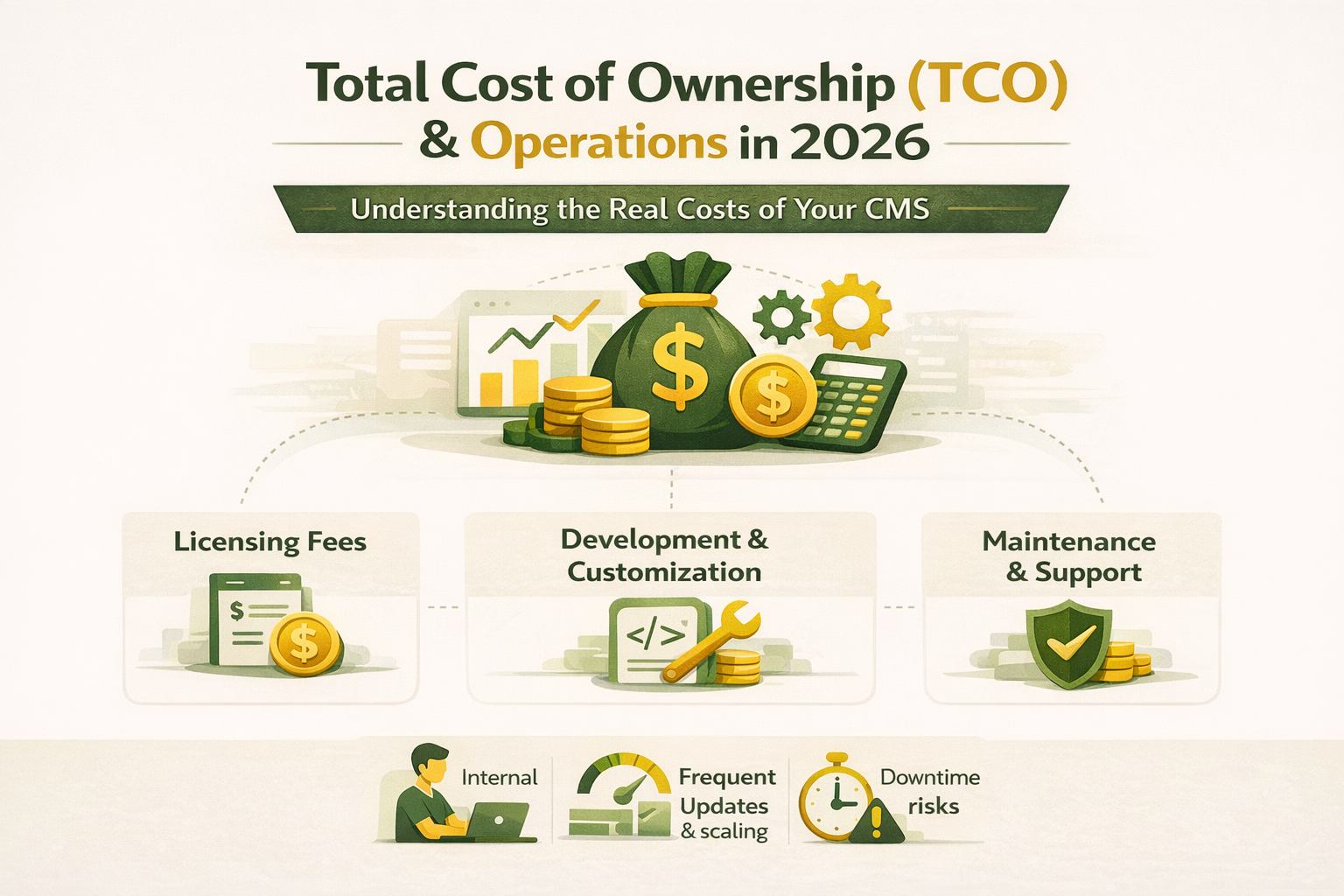
Total Cost of Ownership (TCO) & Operations
In 2026, TCO is more than just the price tag. It’s about understanding the full lifetime cost of your CMS from licensing fees to maintenance, updates, and potential scaling costs.
Choosing a CMS based solely on initial costs can lead to unexpected expenses down the line.
Here’s how TCO breaks down:
- Licensing and Subscription Fees: While open-source CMS platforms may appear free, the hidden costs of custom development, security, and ongoing maintenance can quickly add up.
- Customization and Development: Proprietary platforms might seem easier to implement, but they come with higher licensing fees and less flexibility for custom solutions, especially as your business grows.
- Ongoing Support and Maintenance: Always consider whether the CMS offers adequate support. Regular updates and security patches are non-negotiable, and many CMSs charge extra for this.
But beyond the financials, consider how much internal effort will go into maintaining and optimizing your CMS. A low-cost CMS with high complexity and low scalability could end up costing you more in terms of resources and time.
Why TCO Matters
TCO is critical because it gives you a holistic view of what a CMS will really cost over time. The right CMS should offer a predictable cost sturcture, with minimak surprises down the road.
And while an open-source CMS might have a lower initial cost, the resources and internal expertise required to manage it can quickly add up.
Key Considerations for TCO:
- Open-Source vs. SaaS: Open-source solutions may seem cost-effective, but they require more internal maintenance and may demand higher overhead. SaaS options, on the other hand, reduce the operational burden but may come with ongoing subscription costs.
- Long-Term Scalability: Will the CMS grow with your business? Some systems might be affordable now but become expensive and difficult to scale as your operations expand.
- Exit Strategy: Always consider the cost of switching in the future. What are the data export options and vendor lock-in risks? A CMS that ties you down will eventually cost you more if you need to migrate to another platform.
The Real cost Maintenance & Updates
A CMS that requires constant updates and maintenance can consume valuable resources, both in terms of time and budget. If your CMS needs frequent pathes, upgrades, and support, consider how those costs will scale with your business.
Content Migration & Risk Management
Migrating to a new CMS can feel like an overwhelming task, but it doesn’t have to be. If approached strategically, it can be one of the best decisions you make for your business. In 2026, a successful CMS migration isn’t just about moving content; it’s about minimizing risk and ensuring a smooth transition.
Why Migration Matters
Switching CMS platforms can affect your SEO rankings, content structure, and even your team’s workflow. A poorly planned migration can lead to downtime, broken links, and a loss of content all of which can cost you valuable traffic and revenue.
The good news?
With the right approach, migration can be seamless, ensuring that your new CMS works better, faster, and more efficiently than the old one.
Key Steps in CMS Migration
- Content Audit: Before migrating, take a full inventory of your current content. What needs to move? What should be left behind? This helps you clean up and avoid transferring redundant or outdated material.
- Define Your New Structure: Map out the content model and URL structures in the new CMS. Proper planning here ensures SEO continuity and smooth navigation post-migration.
- Testing and Validation: Always run test migrations in a staging environment to identify issues like broken links, formatting problems, and missing content.
Managing Migration Risks
- SEO Impact: One of the biggest concerns during migration is how it affects search rankings. Proper redirects, content mapping, and maintaining SEO best practices during the migration process will prevent ranking drops.
- Data Integrity: Ensure that your CMS migration maintains content integrity. You don’t want to risk losing crucial data, such as images, videos, or customer information, during the transition.
- Vendor Lock-In: Don’t forget to factor in vendor risks. Does your current CMS have an exit strategy for easy migration if you ever decide to switch again?
Why This Is Critical for 2026
With digital transformation continuing at a fast pace, your CMS is at the heart of your business operations. Any disruptions during migration could stall growth and hurt your customer experience.
In 2026, the CMS migration process should be approached with advanced planning, thorough testing, and ongoing monitoring to mitigate risks and ensure success.
This section emphasizes migration planning and risk management, ensuring that the reader understands why migrating to a new CMS can be transformational, as long as it's done the right way. The goal is to reduce the common challenges and risks that come with CMS migration.
Long-Term Scalability
In 2026, your CMS isn’t just a tool for today it’s a critical piece of your business infrastructure for the years to come. The right CMS should not only meet your current needs but also be able to scale as your business evolves.
Why Scalability Matters
Scalability is about future-proofing your CMS. As your business grows, your CMS needs to handle:
- More content (articles, media, products).
- More traffic (growing customer base).
- New integrations (e-commerce, marketing platforms, etc.).
A CMS that can scale easily will adapt to increasing demands without requiring a total overhaul.
Key Features for Scalability
- Cloud Infrastructure: Cloud-based CMS solutions offer auto-scaling capabilities, allowing your CMS to handle increased traffic without manual intervention. This ensures that your CMS remains responsive, even during peak traffic times.
- Modular and Composable Architecture: With composable CMS, you can add or remove components as your business needs evolve. If you want to integrate a new tool or expand your capabilities, a composable CMS makes it easy to scale without disrupting existing workflows.
- Content Delivery Network (CDN): A CDN-enabled CMS ensures that content is delivered quickly to users, regardless of their geographical location, providing consistent performance as your traffic grows.
Scalability Challenges to Keep in Mind
- Complexity: While scalable solutions like composable CMS offer great flexibility, they also introduce complexity. Managing multiple systems and ensuring smooth integration across platforms can require extra resources.
- Cost: Scaling a CMS often comes with additional costs—whether that’s for cloud storage, additional plugins, or technical support. It’s essential to understand the long-term cost of scaling your platform.
- Training & Adoption: As your CMS grows, internal training becomes crucial. Your team will need to adapt to new features and workflows. Ensure that your CMS vendor provides adequate training and support as part of their offering.
The Future-Proof CMS
The CMS you choose today will impact how easily your business can adapt to new challenges and growth opportunities. In 2026, businesses need flexible, scalable CMS solutions that can grow with them, without unnecessary complexity.
Key takeaway: A scalable CMS gives your business the ability to adapt to future changes and new technologies without being held back by your platform’s limitations.
Choosing the Right CMS for Your Business Needs
By now, you understand that choosing the right CMS in 2026 is not a one-size-fits-all decision. The best CMS for your business will depend on a combination of factors, from performance to scalability, security, and long-term cost.
So how do you choose?
Understand Your Priorities
Start by evaluating what’s most important to your business right now and in the coming years.
Is it seamless integrations?
AI-driven automation?
Performance at scale?
Having a clear understanding of your business goals and digital strategy will help guide your decision.
- For small businesses or simple websites, a monolithic CMS might work well because it’s easy to set up and manage.
- For businesses looking for flexibility and multi-channel delivery, a headless CMS or composable CMS might be better suited, offering more customization and scalability as your needs grow.
Consider Future Growth
You’re not just choosing a CMS for today, you’re choosing a platform that will evolve with your business. Look for a CMS that can handle future traffic spikes, integrate new tools, and scale without constant intervention. Flexibility is key.
- Headless CMS is ideal if you expect to add complex integrations or need flexibility for different platforms (e.g., mobile apps, websites, IoT).
- Composable CMS is great for enterprises that want to mix and match systems for best-in-class solutions as they grow.
Evaluate the Vendor Ecosystem
CMS vendors offer different levels of support and integration options. Ensure the vendor you choose offers strong customer support, a clear roadmap, and a reliable ecosystem of partners and third-party integrations.
- Check for vendor lock-in: Will you be able to migrate away from this CMS in the future without excessive costs?
- Training and support: Does the vendor provide adequate training and documentation to help your team use the system effectively?
Test Before You Commit
Before making a final decision, test the CMS with a pilot program. Run through the basic workflows, test integrations, and assess the user interface. This hands-on approach will give you a better feel for the CMS’s capabilities and limitations.
Final Thoughts: Make the Informed Choice
Choosing the right CMS in 2026 is a strategic decision that will impact everything from your team’s productivity to your customers’ experience.
By considering integration tolerance, AI capabilities, performance, scalability, and cost, you can make an informed decision that ensures your CMS grows with you not against you.
Remember, the best CMS isn’t the one with the most features. It’s the one that fits your business needs, supports your team, and helps you deliver the best possible experience to your customers.

I work with founders and leadership teams when growth moves faster than their systems, teams, or decisions. I’ve led 850+ projects for 750+ clients across 20+ countries, working across 100+ technologies and counting. I care about ownership, clarity, and building things that last beyond the launch.
Featureblogs
01
Haptic Feedback: Why Touch is Becoming the Most Powerful Experience in Tech02
The Top 10 Most Popular Java Frameworks03
The 12 Most Powerful LLMs: Powering Tomorrow’s Tech Landscape04
Why Software Companies Are Turning to Strategic Partnerships for Faster Growth05
Top 8 Python GUI Frameworks for Developers01
Haptic Feedback: Why Touch is Becoming the Most Powerful Experience in Tech02
The Top 10 Most Popular Java Frameworks03
The 12 Most Powerful LLMs: Powering Tomorrow’s Tech Landscape04
Why Software Companies Are Turning to Strategic Partnerships for Faster Growth05
Top 8 Python GUI Frameworks for DevelopersRelatedblogs
01
A Guide to Successfully Outsourcing Your Software Development Project in 6 Steps02
Smart Contracts vs. Regular Contracts03
SDLC vs Agile System Development: Phases, Pros and Cons, and Common Grounds04
Why Mediusware Limited is Your Perfect Global Outstaffing Partner05
10 Best B2B Software Companies in the USA for 2025 – Find Your Perfect Partner!Authorblogs
01
How to Choose an API Development Company for Your SaaS Product02
Why Software Companies Are Turning to Strategic Partnerships for Faster Growth03
Your SaaS Isn’t Slow Because of Developers It’s a Scaling Problem04
Why Some SaaS Companies Scale Faster Than Others05
AI vs Hiring: When Should SaaS Teams Automate Instead of Hiring?